Open source from W&S Technik
W&S Technik GmbH
Since 2007W&S Technik is a service provider for railway infrastructure: we maintain signalling and safety systems, train specialist staff through the W&S Academy and build custom training installations — Technik, Consulting and Services from one source.
Dev team
In-house softwareA small in-house team that builds the software W&S colleagues use every day — internal platforms, automation and infrastructure. When a tool solves a problem others have too, we publish it under an open licence.
Claude Usage Tray
Windows tray app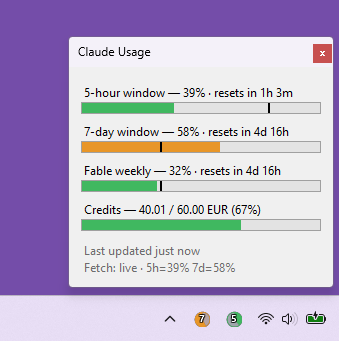
Your Claude limits, always visible — right next to the clock.
Claude Code tells you that you hit a limit after you hit it. This sits in your tray and tells you it’s coming — the rolling windows, the per-model weekly cap that throttles first, and how much paid credit you’ve burned this month.
- Two badge iconsFill shows usage, colour shows severity, the digit names the window — 5 hours or 7 days.
- Per-model capsWeekly limits scoped to a model or surface — the cap that usually bites first.
- Credit spendPaid extra usage against your monthly limit, in your account’s currency.
- Reset countdowns“Resets in 3h 58m” on hover and in the popup.
- Pace marker & coloursA line shows where the clock is in the period; colour follows usage against the clock, not raw percent.
- Platform statusA warning badge appears while status.claude.com reports anything but “All Systems Operational”.
Per-user install, nothing written outside your profile. Polls Anthropic’s usage API every 5 minutes and falls back to Claude Code’s local cache.
MeshCentral Agent for Docker
Container imagePut a container on your MeshCentral map — two variables and a volume.
MeshCentral hands you an install script meant for a host, not a container. This image wraps it: point it at your server and a device group, mount one volume, and the agent installs itself once and comes straight back up on every restart. The probe variant brings a network toolkit, so a remote terminal on site is somewhere you can actually diagnose from.
- Nothing baked inThe agent comes from your own server’s installer, so it always matches the server it reports to.
- One volume/meshagent holds the installation — later starts find it and skip the download.
- Stable identityPin the MAC address and the device keeps its NodeID across restarts; the container warns if it moves.
- Probe or slimThe probe adds ~25 network tools — dig, mtr, tcpdump, nmap — for MeshCentral’s remote terminal; slim is the agent alone.
- Fails loudlyA bad URL, group ID or installer stops the container with a message naming the cause, instead of half-installing.
- Two release tracks:stable moves only on a tagged release, :latest follows every build; both leave an immutable tag to pin.
services:
  meshcentral-agent:
    image: ghcr.io/wus-technik/docker-meshcentral-agent:stable
    restart: unless-stopped
    hostname: meshagent-site01         # the device's name — set it once
    mac_address: "02:57:53:03:01:01"   # pins the NodeID
    volumes:
      - ./meshagent-data:/meshagent
    environment:
      MESH_SERVER_URL: "https://your-meshcentral-server.com"
MESH_GROUP_ID: "your-group-id" # write each $ as $$Not affiliated with MeshCentral. The agent itself is downloaded from your own server and carries its own licence.